Account Tracker is the MT4 and MT5 monitoring tool that Algo Trading Space (ATS) builds and runs. Like Karnek, it reads accounts through a read-only EA in the terminal and cannot trade. The two overlap more than most tools in this space: both follow many accounts from one dashboard, split one robot's results by broker, track prop challenge limits and send alerts. The differences are in price, how often the terminal reports, how problems are detected and what a public page shows.
Checked on 2 October 2026. Every Account Tracker fact here comes from Algo Trading Space's own pages on that date, and the pages are listed under Sources at the end. Prices and features change, so check their current pages before you decide.
The short answer
If price per account matters most, or you want backtest-versus-live analysis, an API or Discord alerts, Account Tracker gives you more for less: Pro costs €29 a month for up to 100 accounts. If you want the terminal checked every 30 to 90 seconds rather than every few minutes, strategies watched against their own trading rhythm, and a public page that shows when monitoring began, its uptime and any gaps, Karnek is the alternative, at a higher price.
Where Account Tracker is ahead
- Price. The free plan follows up to five MT4 or MT5 accounts with core tracking, and the first 14 days include every Pro feature. Pro is €29 a month for up to 100 accounts, and the VIP Club, at €49 a month, removes the account limit. On Karnek, ten accounts cost $39 a month, 25 cost $79, and 100 would cost $304 (Pro plus 75 extra accounts at $3 each).
- Backtest against live. Pro can take an uploaded Strategy Tester report and overlay it on the live record, and runs eight anomaly checks with a written verdict on whether live trading still follows the backtest. Karnek does not take backtest reports.
- More ways to get alerts and data. Pro alerts reach Discord, Telegram or browser notifications, and Pro includes API and MCP access and AI analysis credits. Karnek alerts by email and Telegram and does not offer a public API.
- Reports and setup tools. Account Tracker lists frozen monthly snapshots, a printable monthly report, an annual tax report and CSV exports, a one-command installer for every terminal on a VPS (in beta), preset files and a privacy toggle that masks account numbers and names.
What both do
To compare like with like, these are shared. Both read MT4 and MT5 through a read-only EA. Both put one robot's results side by side broker by broker. Both track prop challenge limits: Account Tracker lists profit targets and daily or overall drawdown limits, and Karnek tracks profit target, maximum drawdown, daily loss and the consistency rule, with warnings at 80% and 90% of a limit by default. Both offer read-only public sharing of a record.

What Karnek does differently
These are the parts of Karnek you pay the extra for. All of them are live today.
A report every 30 to 90 seconds
Account Tracker's product page says its EA sends an update every 200 to 300 seconds. Karnek's connector reports every 30 seconds by default, and the MT5 agent every 60. Alerts are checked every minute, and the offline alert fires after the number of minutes you choose, five by default. The shorter the reporting interval, the sooner a stopped terminal can show up.
Three signals in every report
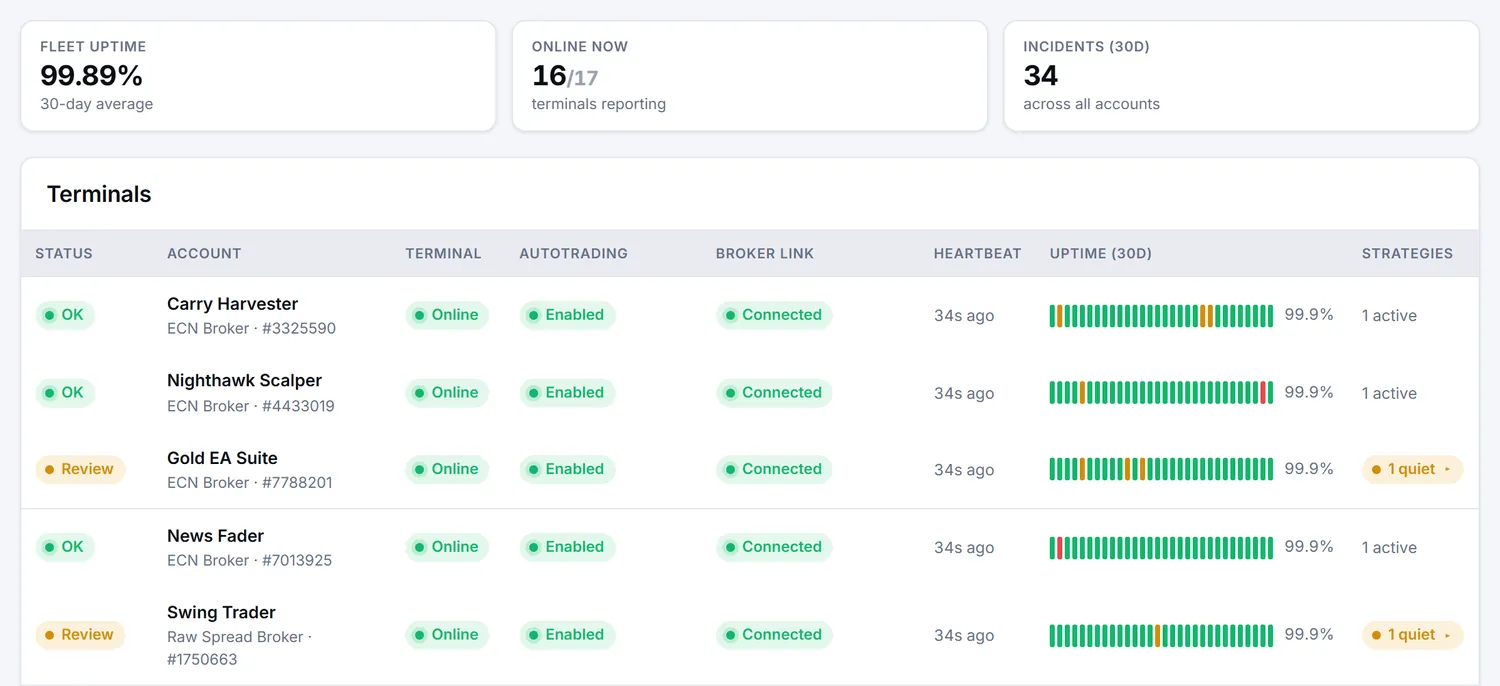
Each Karnek report carries three things: the terminal is alive, it is connected to the broker, and AutoTrading is switched on. The account page shows them separately, so a dead VPS, a lost broker connection and a switched-off AutoTrading button each read as what they are, and each can raise its own alert. Account Tracker groups accounts as Healthy, Warning, Critical or Inactive based on thresholds you set, with Pro alerts on equity changes, drawdown thresholds and connectivity issues.
Quiet strategies, judged against their own rhythm
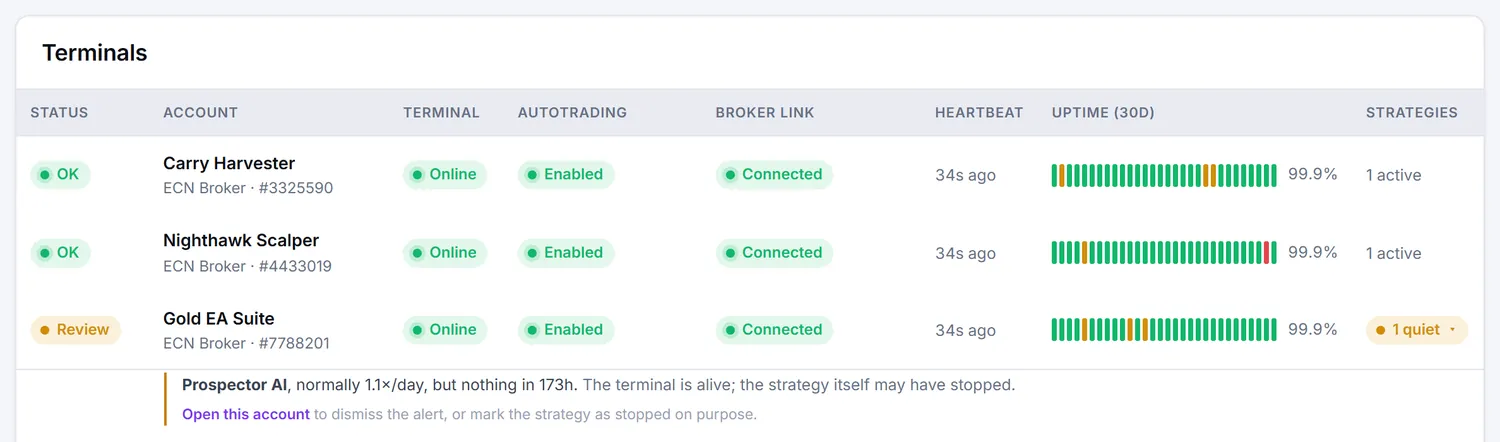
Karnek learns how often each strategy normally trades and flags one that has been silent for longer than its own usual gap, with weekends allowed for. A strategy is checked once it has at least 12 trades over a week or more in the last 60 days. Account Tracker's Pro anomaly checks include a trade-frequency change detector. Karnek's version is part of every account's health check on every plan, and raises an alert on Starter and up.
A public page built to be checked
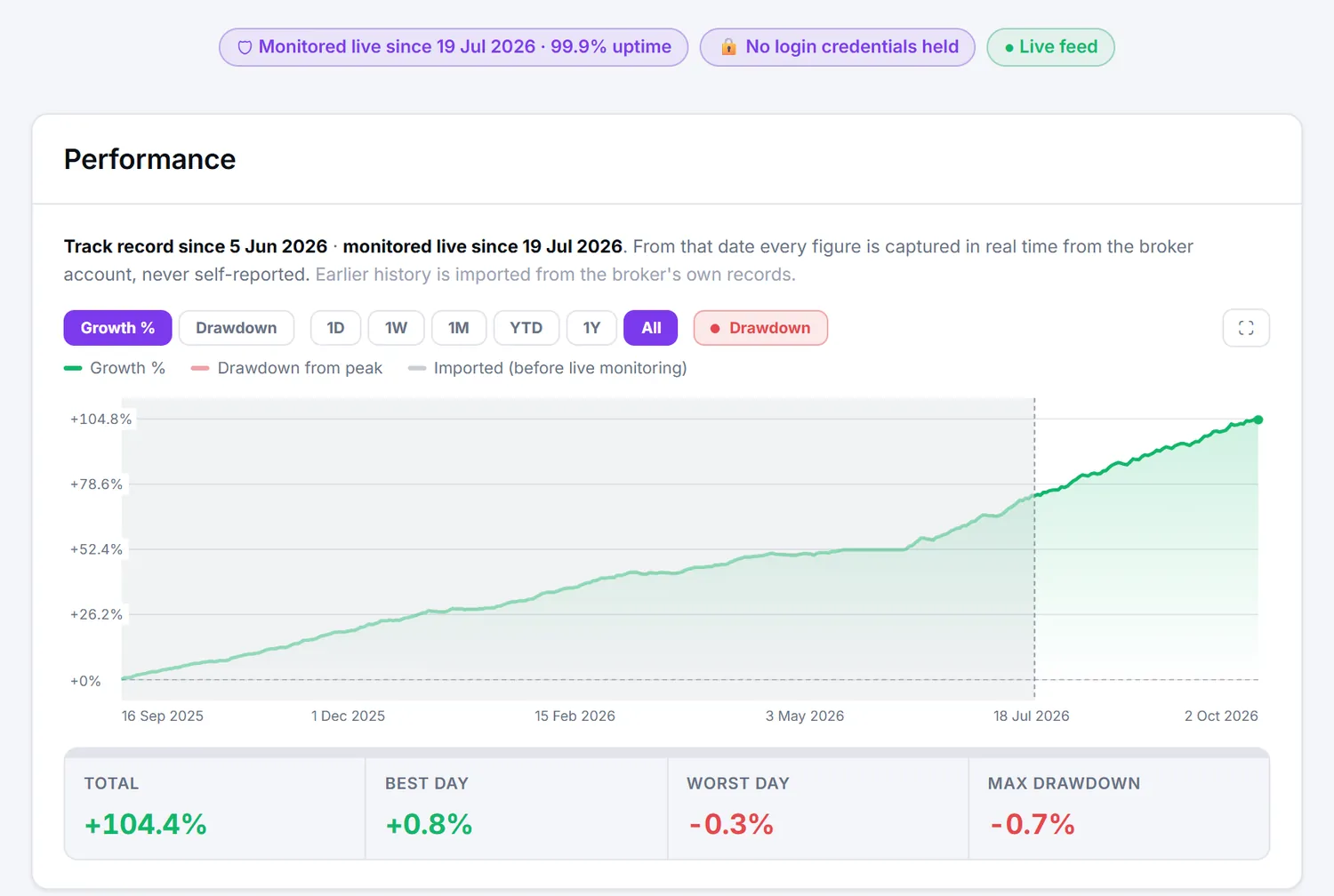
A Karnek public page shows the date live monitoring began, uptime over the last 30 days, any gaps in monitoring, and whether the account is real money, a prop challenge or a demo. History from before monitoring began is imported from the broker's records and marked as such on the chart, and no backtest ever appears on it. Public pages and widgets come with every plan, the free one included. How Karnek verified results work explains the full chain.
Correlation across the fleet (Pro)
Pro shows which accounts and strategies move together and which offset each other, so concentration risk shows up before a bad week does. Strategy correlation covers how to read it.
Side by side
Where a company's own pages do not state something, the cell says so rather than guessing.
| As published on 2 October 2026 | Account Tracker (ATS) | Karnek |
|---|---|---|
| Run by | EA Academy LTD, Bulgaria, trading as Algo Trading Space | Stanchion Systems Ltd, England and Wales, trading as Karnek |
| Free plan | Up to 5 accounts, core tracking; first 14 days include Pro | 1 account (5 for the first 14 days), live dashboard, health checks, public verified page and widgets, no alerts |
| Paid plans | Pro €29 a month, up to 100 accounts; VIP Club €49 a month, unlimited accounts | Starter $19 (3 accounts), Trader $39 (10), Pro $79 (25), extra accounts $3 each |
| Platforms | MT4, MT5 | MT4, MT5 |
| Can it trade your account? | No, the EA is read-only | No, the connector has no trade functions |
| How often the terminal reports | Every 200 to 300 seconds | Every 30 to 90 seconds |
| Alerts | Pro: equity changes, drawdown thresholds, connectivity; Discord, Telegram, browser | Starter and up: offline, AutoTrading off, broker link lost, strategy gone quiet, drawdown, margin; email and Telegram |
| Same EA across brokers | Side by side, broker by broker | Per broker, compared per lot, net of commission and swap (Trader and up) |
| Prop challenge tracking | Profit targets, daily and overall drawdown limits | Trader and up: target, max drawdown, daily loss, consistency; warnings at 80% and 90% by default |
| Backtests | Backtest-vs-Live analyzer (Pro) | Not accepted |
| Public sharing | Read-only links that can expire, embeds | Public verified page and widgets on every plan, with monitored-since date, uptime and gaps |
| Fleet correlation | Not stated on their pages | Pro |
| Reports | Monthly snapshots, printable monthly report, annual tax report, CSV exports | Monthly PDF report, Starter and up |
| API | API and MCP (Pro) | Not offered |
What you pay for with Karnek
Karnek is paid for by subscription. It never trades your account, takes no share of your profits and never needs your trading password. Karnek's free plan covers one account, with the live dashboard, health checks and a public verified page. Alerts by email and Telegram and the monthly PDF report start on Starter, at $19 a month for three accounts. Prop challenge tracking and the per-EA and per-broker analysis start on Trader, at $39 a month for ten accounts. Pro, at $79 a month for 25 accounts, adds side-by-side account comparison and fleet correlation. Extra accounts are $3 a month each on any paid plan, annual billing costs ten months' price, and every paid plan starts with a 14-day free trial.
For a small fleet the gap is modest, for a large one it is wide: at 100 accounts Account Tracker Pro is €29 a month and Karnek is $304. Whether the faster report and the health model are worth that depends on what a stopped EA or a breached challenge costs you.
FAQ
Is Account Tracker free? Yes, for up to five accounts with core tracking. Pro costs €29 a month for up to 100 accounts, and the VIP Club €49 a month for unlimited accounts. That was the position on Algo Trading Space's pages on 2 October 2026.
Which one reports more often? Account Tracker's page says its EA sends an update every 200 to 300 seconds. Karnek's connector reports every 30 seconds by default, and the MT5 agent every 60.
Can either of them trade on my account? No. Algo Trading Space says the ATS Terminal EA never places, modifies or closes trades. Karnek's connector has no trade functions at all.
Does Karnek compare backtests with live results? No. Karnek does not accept backtest reports. If backtest-versus-live analysis is what you need, Account Tracker Pro offers it.
Can I run both? Yes. Both are read-only EAs that sit on a chart, so they can run side by side in the same terminal.
Choose by the job
For more accounts per euro, backtest-versus-live analysis or an API, Account Tracker is the stronger choice. For a terminal report every 30 to 90 seconds, strategies watched against their own rhythm and a public page that shows when monitoring began, try Karnek on one account for free.
Sources
Algo Trading Space pages, all checked on 2 October 2026:
- Account Tracker features, update interval, alerts, plan prices and operator: algotradingspace.com/software/account-tracker
- Free plan, 14-day Pro trial and Pro price: platform.algotradingspace.com/shop/memberships/account-tracker
Karnek facts: pricing, security and verified results.
Written and reviewed by the Karnek Research team. Last updated October 2026.
Educational content only, not financial advice. Past performance does not predict future results. Trading carries significant risk.