On the first of every month, Karnek closes the books on the last one. For each account it builds a single PDF: what the account made, which EA made it, and how far it dipped along the way — clean, branded, and ready to forward without you opening a spreadsheet. This guide covers what's on it, why the numbers won't move after the fact, and the evening of admin it saves you.
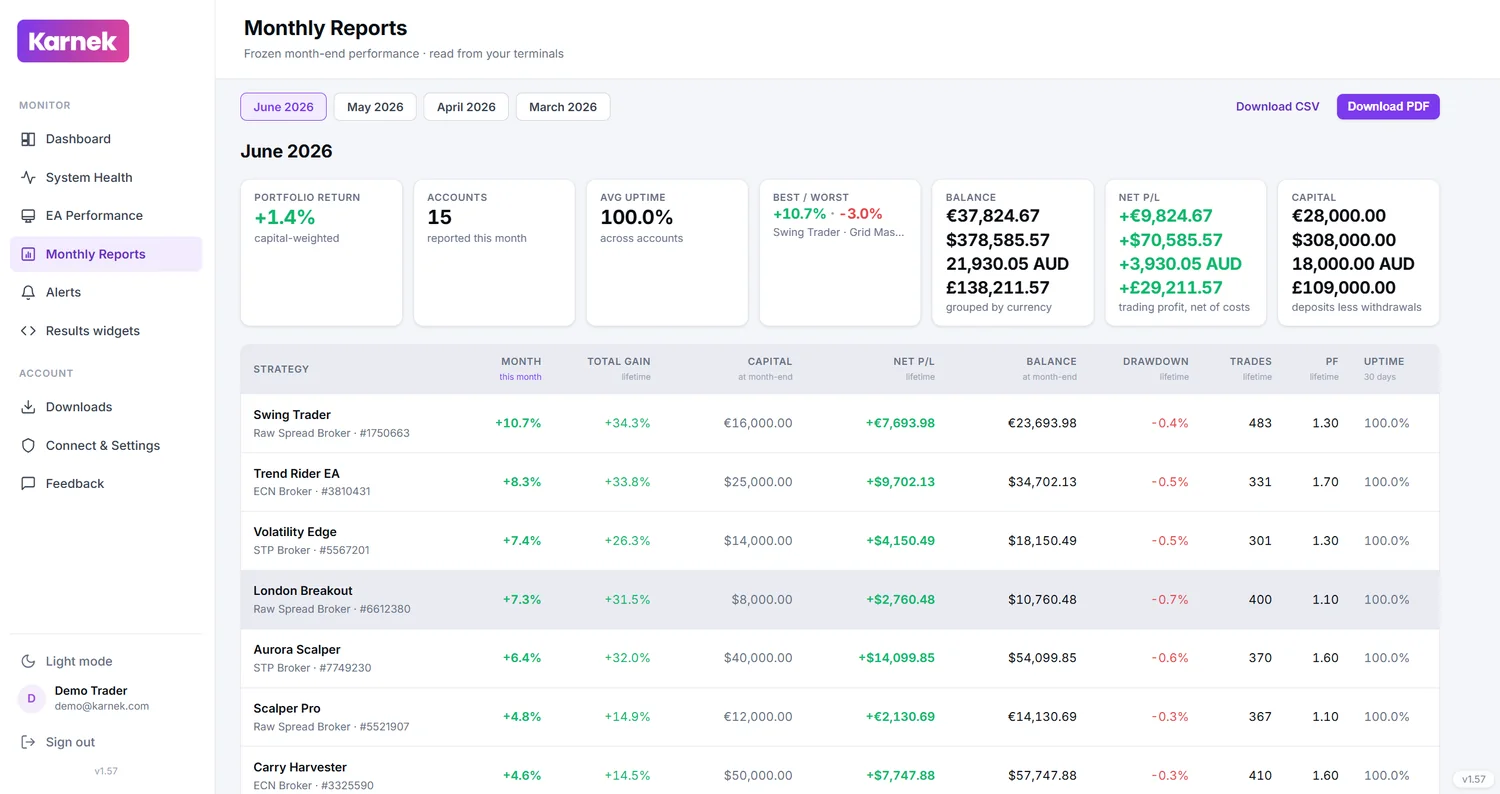
What's on the report
Four things carry the report:
- Net profit for the month — net meaning after commission and swap are taken out, not the gross figure that flatters a busy account. What the account actually kept.
- A per-EA breakdown — every strategy on the account and what each one contributed, so a single strong month from one EA can't paper over three quiet losers.
- Best and worst — the standout strategy and the one that dragged, named, so you can see where the month was won or lost.
- Drawdown — the deepest the account fell during the month, not just where it happened to finish.
Read together, that's the whole month on one page: the result, the reason, and the risk it took to get there.
Why the month-end snapshot is frozen
A live dashboard always shows the latest number. That's what you want day to day — and exactly what you don't want in a client report.
If the figure keeps moving, the statement you sent on the 3rd disagrees with the one your client opens on the 20th, and now you're explaining the difference instead of the performance. Karnek freezes the month-end snapshot the moment the month closes: April's report shows April as it stood at 23:59 on the 30th, and it stays that way for good. Send it once and it stays true.
A frozen report is also a record. Twelve of them, in a row, are a track record you can hand over without anyone wondering whether last month's number was quietly revised.
The admin it removes
Without this, a monthly statement is an evening's work. Export the history, strip the test trades, work out commission and swap, rebuild the totals per strategy, then format the thing so it looks like it came from a business rather than a raw terminal export. Do that for one account and it's tedious. Do it for fifteen, every month, and it's a standing job you come to dread.
Karnek does it on the 1st, for every account at once, in the same layout each time — so your client learns to read your report at a glance instead of relearning a new spreadsheet every month.
Sending it straight on
Because the PDF is branded and already investor-friendly, there's no middle step. You're not turning your working numbers into something presentable; the presentable version is what Karnek generates. Forward it, attach it, or file it — the person on the other end sees a tidy statement, not a screenshot of a terminal.
The Karnek note
Karnek reads your accounts read-only and reports what happened — it builds the statement, it doesn't manage the money. It can't place, close or adjust a trade, and nothing in the report is typed in by hand, so what you send is exactly what the terminal recorded.
Written and reviewed by the Karnek Research team. Last updated August 2026.
Educational content only - not financial advice. Past performance does not predict future results. Trading carries significant risk.